Terra Galleria Photography

Photo Spot 34: Great Smoky Mountains National Park – Clingsman’s Dome

The Appalachians, largest mountain range in the Eastern US, culminates at its southern end in North Carolina and Tennessee. Those two states split Great Smoky Mountains National Park, which preserves one of the finest virgin deciduous forest in the world.

The top of Clingsman’s Dome is the highest point in the Park, at 6,643 ft (2,025 m). The only (slightly) taller mountain East of the Mississippi is Mount Mitchell 6,684 ft (2,037 m), northeast of Ashville, NC. Clingman’s Dome is extremely easy to access, as a 7-mile spur road, branching from the Newfound Gap Road, leads to a large parking lot near the top, from which the best photography spots are found.

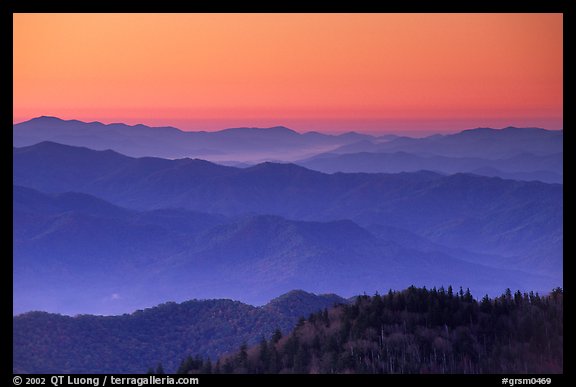
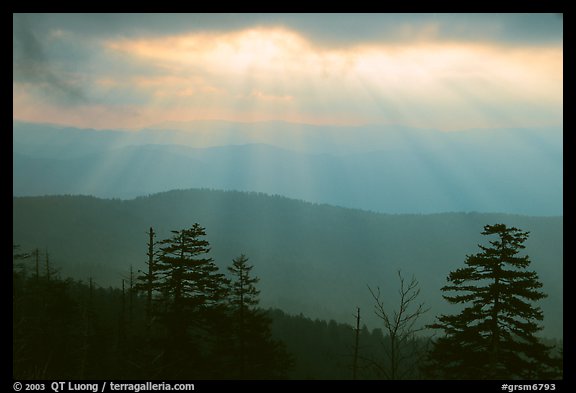
From the peak, located almost at the center of the park, I found large gaps between trees – just at the edge of the parking lot – that framed great views over forested ridges, extending to the horizon. The Great Smokies were named for the fog that often hangs over the range. This fog is the result of warm humid air from the Gulf of Mexico cooling rapidly in the higher elevations of Southern Appalachia. It made the views more special by allowing me to create compositions with layers of ridges fading in the distance. Their progressively lighter tones provides the strong three-dimensional clue named “aerial perspective”, first used in paintings from the Netherlands in the 15th century, and then in the Mona Lisa.

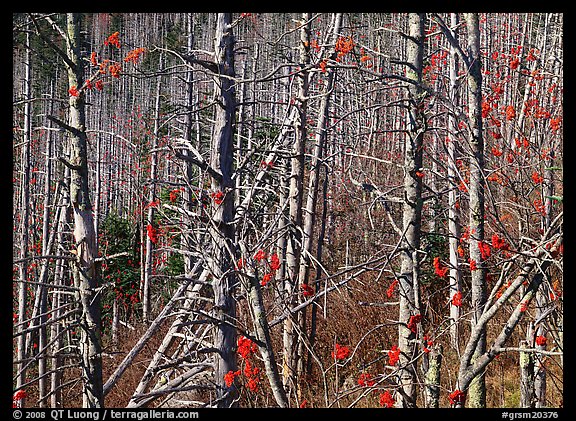
The light is fine both at sunrise and sunset. At sunrise, I prefer to set-up the camera at the east end of the parking lot, while I find the west end preferable for sunset. I walked once to the top of observation tower, through a half-mile paved trail, but the view from the rounded summit wasn’t as interesting, that is unless one is interested in surveying dead trees.

Fog is more likely to be found in the morning. I set up my alarm one hour and half before sunrise. It took more than half an hour to drive there from the campground (same as from Gatlinburg). In the spring and fall, the temperature on the top often drops below freezing at night. I noticed icicles forming where streams drop onto the road Clingman’s Dome road. Arriving at the top 40 minutes before sunrise, as I stepped out of the car, I was greeted by temperatures much colder than at the campground. However, there was no temptation to retreat into the car, as an intense orange glow lit the eastern horizon, contrasting with the blue ridges. Since those ridges were backlit and quite darker than the sky, I used a graduated neutral filter to keep the contrast in check. After the sun came and illuminated the entire landscape, I switched to a wider lens, including foreground trees into my compositions. Although the sun got higher in the sky, I was still shivering from standing for a prolonged time in the cold, although by the time I drove down, the icicles had started to collapse.

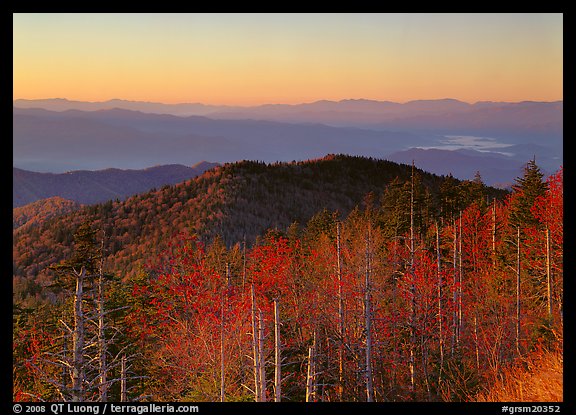
Great Smoky Mountains it the most visited of all National Parks, so summer crowds can jam the roads, although it is usually pretty quiet before sunrise. Spring sees less visitation and a variety of blooms. With all this variety of deciduous trees, autumn offers a spectacular sea of colors which in general peak at mid-October at the higher elevations. However, I prefer to photograph the colors from the Newfound Gap road, where closer trees in fall foliage provide a more harmonious foreground. The Clingsman’s Dome road is closed in winter and doesn’t re-open until April.

View more images of Great Smoky Mountains National Park
View more images taken from Clingman’s Dome

Mac system re-install and software list

They say “it just works”. However, over the last month, my Apple computer just crashed. The symptom is a “kernel panic”, with a message over the frozen screen advising to hold the power button. This first happened a few times a week, and then worsened to several times a day. After two other support people, I talked to a senior Apple tech person who guided me through a “archive and re-install” (which nevertheless broke quite a few of my applications) but eventually the problem resurfaced. Very annoying for a relatively high-end Mac Pro configuration with 2x Quadcore 2.8, 10GB RAM, 2 internal 1GB drives and 2 raided Raptors.

The next step was to do the dreaded clean install, that is to format a brand-new drive, re-install mac OS (I also upgraded to 10.6, Snow Leopard), reinstall each of my applications individually, and restore my data from backup.

I wasn’t looking forward to it, since I knew it would take most of the week-end. You’ll understand why when you see the software installed. While some of them applications are quick to install, others took some time (Windows XP), extensive reconfiguration of preferences (Photoshop), or experimentation (Parallels, ImageMagick).

For each of the applications, I searched on the web to find the most up to date version, as well as tips to resolve problems. I am wondering how we were ever able to use computers before the web days. For instance, to get the Samsung printer to work, you had to open system pref>printer & faxes> and then to right click in the *blank* space below the list of printers in order to reset the printing system before trying to add the printer again.

So what’s the result of this “fun” week-end ? More kernel panics, apparently related to external drive operations. Grrr ! Any ideas, besides switching to Windows ?

Maybe the only upside is a cleaner (but still faulty) system, which at least doesn’t crash while doing nothing, and for you, reader, an opportunity to take stock of the software I am running, in case you’re curious:

  1. Drivers
    • Microsoft keyboard
    • Kensington mouse
    • SpectraView driver/calibrator for NEC display
    • Samsumg ML 1700 driver
    • Epson 1800 driver
    • Vuescan for Nikon LS 4000 scanner
    • Silverfast for Epson 4870 scanner
  2. System Applications
    • Firefox + Google toolbar
    • Thunderbird
    • Microsoft Office
    • Carbon Copy Cloner
    • Synchronize X plus
    • Macaroni
    • Tweetdeck
    • Aquamacs Emacs
    • Google Earth
    • Gpsbabel
  3. Imaging Applications
    • Adobe Creative Suite
    • Noise Ninja PS plug-in
    • Photokit sharpener PS plug-in
    • Genuine Fractals PS plug-in
    • Lightroom
    • DxO Optics Pro
    • AutoPano Pro
    • Quicktime 7 Pro
  4. MS Windows Applications
    • Parallels desktop
    • Windows XP on Boot Camp
    • Imatch on Windows XP
    • Imatest on Windows XP
    • Trackstick Manager on Windows XP
  5. Server Applications
    • Xcode
    • MySQL
    • ImageMagick (including jpeg,tiff,png,freetype,lcms)
    • exiftool
    • Image-IPTCInfo
    • perl DBI
    • perl DBD::mysql

The observant readers may have noticed that the list doesn’t include the Epson 9800 printer driver. Since printing is such a business-critical task, I have dedicated an older computer (a G5) to driving the printer with an older version of Photoshop. I’ve read that there has been quite a few color management problems with newer versions. On the other hand, unlike my Mac Pro, the G5 has been running like a champ !

Photo Spot 33: Mammoth Cave National Park – Frozen Niagara

Over 300 miles of caves have been mapped in Mammoth Cave National Park, making it the largest known cave system in the world. Depending on the season, the National Park Service offers up to a dozen different tours into the caves.

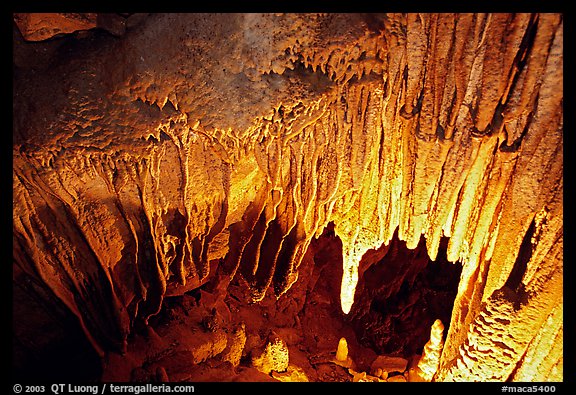
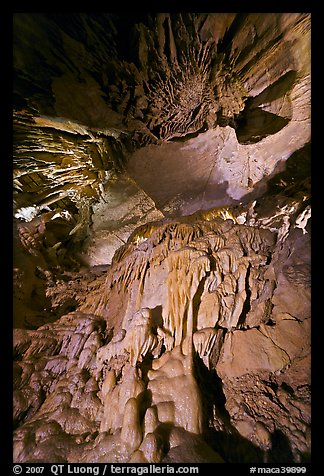
Although some of the tours can last up to 6 hours, most of the chambers do not contain intricate cave formations. The most beautiful area of the cave is the Frozen Niagara section, where stalactites and stalagmites are found in abundance. After descending a few hundred stairs, the rest of the distance is less than a mostly horizontal mile, finishing in a room heavily decorated with flowstone. On the way, you pass intriguing sights, such as Crystal Lake. Long tours visit the Frozen Niagara section only briefly. For this reason, I recommend to photographers the “Frozen Niagara” tour, which spends all of its time (total about 2 hours, including transportation by bus for a couple of miles from the visitor center to the “New” cave entrance) there. This has the additional advantage of leaving you some time to explore the surface terrain, which is quite interesting in its own right. Buy the tickets for your tours as you arrive, since tours can sell out fast during the day.

Unlike in Carslbad Caverns, Park regulations make it difficult to photograph.

First, tripods are strictly prohibited. Since the light levels are relatively low, this leaves you with few options. You can use flash, but it will be a challenge to light the cave formations in a pleasant way. The best method I have found is to bring a Bogen Super Clamp which works very well on the tubings of the cave railings. The clamp is inexpensive and very sturdy. I have used it to photograph with a large format camera in the cave, and it provided enough rigidity ! To attach your regular tripod head, you’ll find on the top a 1/4 inch threaded hole in which you can screw in a stud. Since most tripod heads have a 3/8 inch thread, you will probably need a 1/4 to 3/8 reducer bushing as well. You can walk around with the ball-head and clamp attached to your camera. I have found this set up particularly effective for photographing Crystal Lake from the shaft above.

Second, you will be in a tour group, as there are no self-guided tours. A ranger trails the group to keep stragglers moving, so it’s not possible to stop very long to photograph. The best bet would be to place yourself at the end of the group, since at the beginning of it, other visitors want to keep up with the other ranger to listen to his commentary during the half-dozen stops during the visit. More tours are offered in the summer, however the other seasons see fewer crowds (tour groups can number up to 100) and therefore tour groups that are smaller and more relaxed, with possibly more flexible rangers. Towards the end of October, the surrounding woods display beautiful fall colors.

See all images of Mammoth Cave National Park

Photo Spot 32: Hot Springs National Park – the Cascade

It is easy to dismiss at a first glance Hot Springs National Park. The smallest of the US National Parks (just over 5,500 acres) consists mostly of Central Avenue, the main street of Hot Springs, Arkansas, and seemingly undistinguished hills.

So why is it the oldest area in the National Park System, set aside as a special reservation in 1832, a full 40 years before Yellowstone became the first National Park ?

At that time, Hot Springs had already became famous as a heath spa where people “took the waters” that come from the 47 hot springs flowing in the surrounding hills. While the man-made nature of the row of well-preserved historic bathhouses is clear, it is less obvious that the hill above this row, Hot Springs Mountain, is a man-made landscape. Tufa once coated it, and waters ran over it. The waters were diverted in a plumbing system, and the slope covered with dirt and vegetated. The artificial landscape is interesting to observe, in its gradual transition from city to woodland, with the Grand Promenade bridging them. Fall brings spectacular colors to the woods, as bright as any other place in the southern Appalachian mountains.

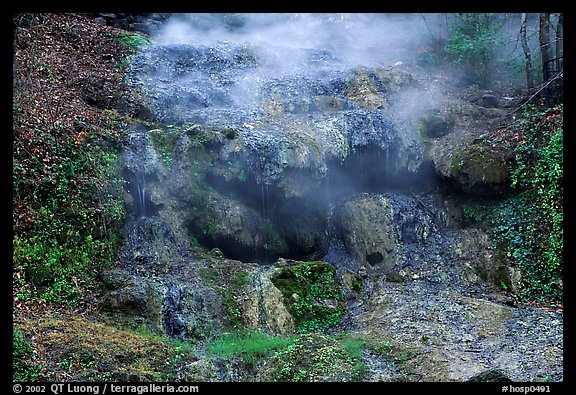
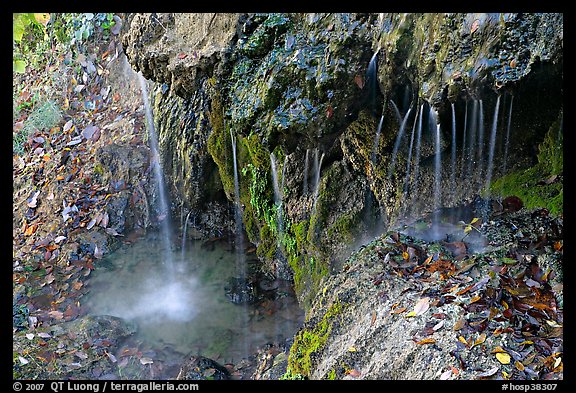
In the early 80s, a spot was cleared of dirt so that a hot spring could be seen again. This spot, called the Cascade, past Bathhouse Row, near the intersection of Central Avenue and Fountain Street, remains the only place in the park to view hot water cascading over tufa terraces.

The cascade is most interesting to photograph early in the morning, when the cooler temperatures give rise to denser steam. At that time of the day, it is still in the shade, and therefore uniformly lighted. You can observe the whole cascade from the base, or walk up stairs to a point that offers close-ups views of the water, tufa, and blue-green algae.

View all images of Hot Springs National Park

Canon 24 TSE-II v 24 TSE, a comparative review

About a decade ago, I switched from Nikon to Canon. I was attracted, among other things, by the availability of a 24mm tilt and shift (T/S) lens, which brings to 35mm some of the controls available to the large format camera photographer. While it has served me well, its T/S functions making it possible to create higher quality images than would have been possible with a regular lens, it had a number of shortcomings. My main gripe was that there wasn’t enough of an image circle to shift fully the lens in vertical orientation. I also wished that the image quality was better, since when used as a regular lens, it wasn’t even as sharp as my zooms, and suffered from serious chromatic aberration.

Last year, maybe challenged by Nikon’s new great 24 T/S lens, Canon introduced a revision of their own 24 T/S lens. It is in fact an entirely different lens, physically quite similar to the Nikon. The goal seems to have been to produce a high performance lens, regardless of size and weight, which are all significantly larger than the previous version.

left: 24 TSE (old) – right: 24 TSE-II (new)

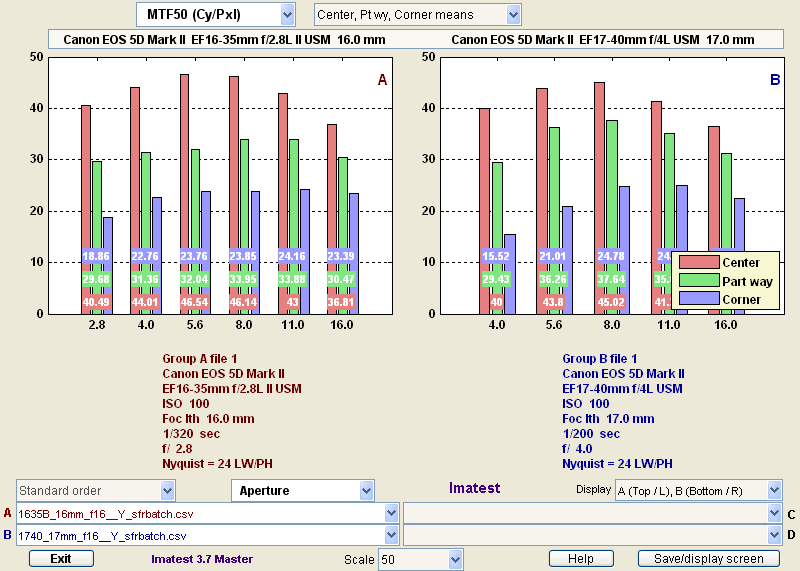
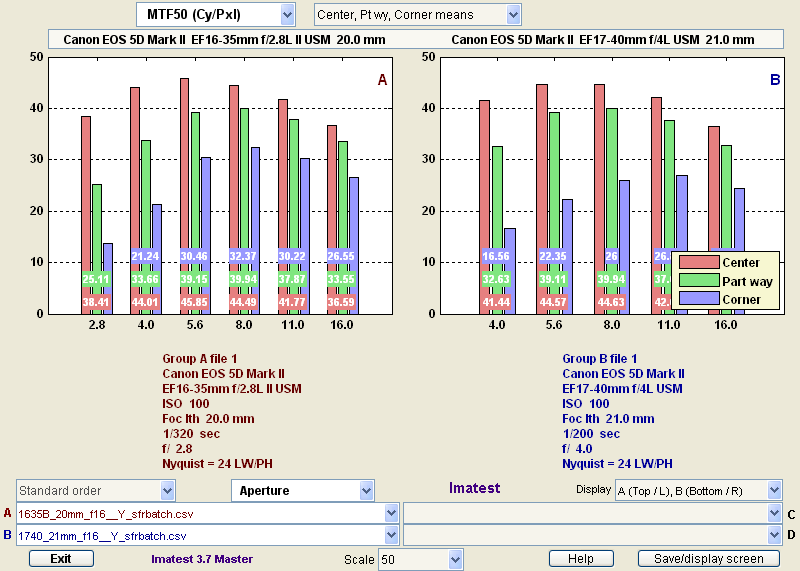
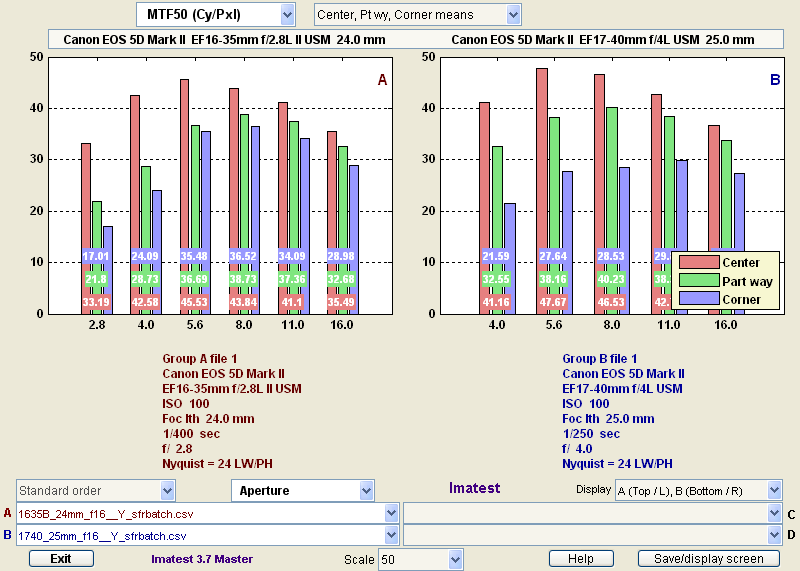
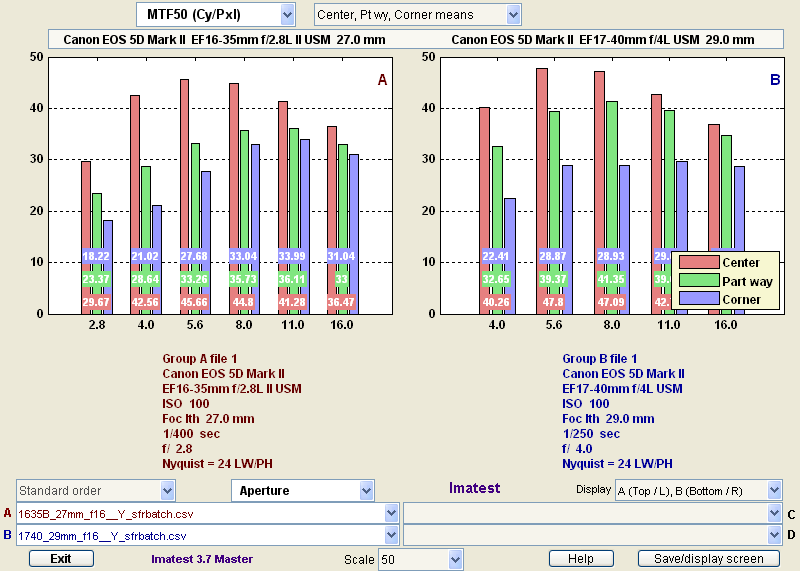
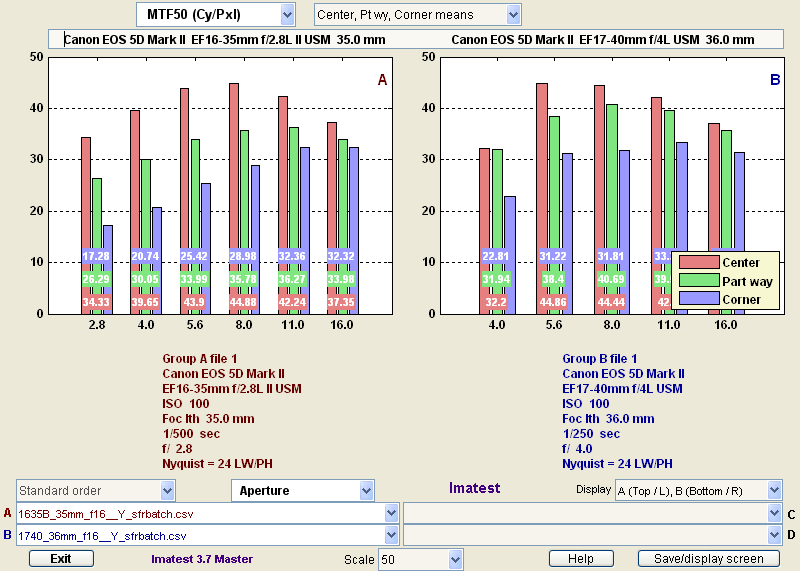
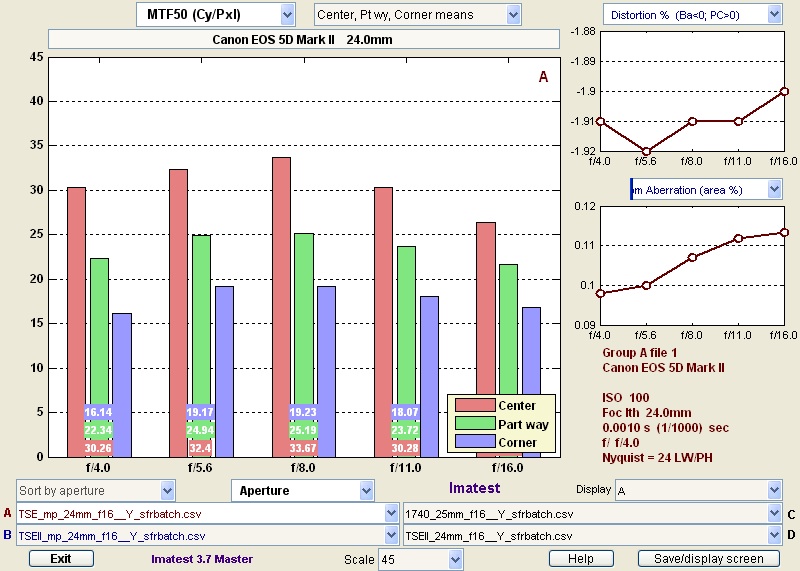
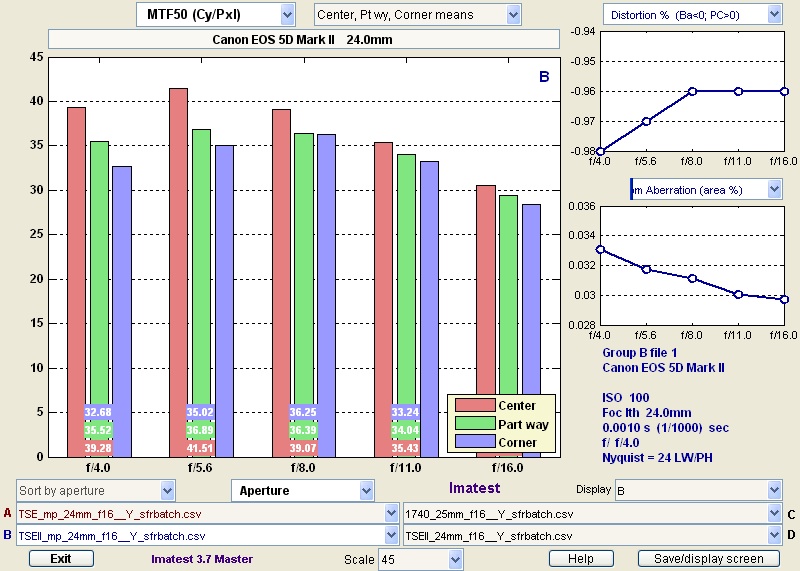
Did Canon deliver on their promise of a high-performance lens ? As the Imatest (best way to measure lens performance, see details here) charts below show, the answer is an unqualified yes ! The new lens is impressively sharp even wide open, with corners almost as good as the center, which is extremely rare for a wide angle lens. It boasts a significantly larger image circle, which now allows a full 12mm shift in both horizontal and vertical orientation. In fact, it has been reported that the image circle is so large that the new lens can be used with a medium format camera. Controls are much improved. The ability to use independent axis for tilt and shift (unique to the Canon design) is a nice bonus.

top: 24 TSE (old) – bottom: 24 TSE-II (new) – click to enlarge

Both lens are manual focus with focus confirmation, automatic aperture, and a solid all-metal construction. The table below summarizes the differences I have found between the two lenses. There are so many improvements that I feel that the new lens is well worth its price, despite it being almost twice as much the price of the old lens.


24/f3.5L TSE 24/f3.5L TSE II (2009)
T/S axis One rotation mechanism for both T and S. By default T and S axis are perpendicular. This can be changed to parallel by dissassembling rear of lens (requires a sharp Phillips screwdriver). Unique two independent rotation mechanisms, one for T and S, one for T, so each of them can be placed at an arbitrary position.
T/S locks Tiny friction knobs for T and S, easily jammed (I’ve had to use pliers). Lack of positive lock for T can ruin images. Larger friction knobs with deeper grooves for T and S. Switch with zero-detent for T.
Maximum Shift 11mm along short side, 7mm along long side 12mm along both sides. Enough shift to place base of buildings near bottom of frame even in vertical orientation.
Maximum Tilt 8 degrees 8.5 degrees
Close Focus 1 ft./0.3m
0.14x magnification
0.69 ft./0.21m
0.34x magnification
Sharpness less sharp than 24-70/f2.8, 24-105/f4, 17-40/4, 45 TSE significantly sharper at all apertures, in particulars in corners
sharper than 24-70/f2.8, 24-105/f4, 17-40/4, 45 TSE
Distortion barrel 1.9% barrel 0.96%
Chromatic Aberation marked in areas of strong contrast near edges (0.1) not noticeable (0.03)
Other Furthest focus is infinity Focuses past infinity. Newer coatings (for better ghosting and flare resistance). Circular aperture (for better highlights/bokeh).
Lens construction 11 elements, 9 groups 16 elements, 11 groups
Filter size 72mm 82mm
Size DxL 3.1 x 3.4 in./78 x 86.7mm 3.5 x 4.2 in./88.5 x 106.9mm
Weight 20.8 oz./570g 27.5 oz./780g
Price (06/2010) $1200 street, $1900 list (discontinued)
look for a used @ amazon
$2100 @ BH
$2100 @ amazon
(List: $2500)

Photo Spot 31: Acadia National Park – Cadillac Mountain

Acadia National Park is my favorite landscape location on the East Coast because it packs in a small area (only 40,000 acres) such a great variety of scenery. The shoreline includes beaches, headlands, boulders, and slabs with a range of orientations. Large and small freshwater bodies are surrounded by two major forest types (eastern deciduous and coniferous north woods) meet. Then, there are the peaks, both forested and bald, from which you can see all those landscape elements at the same time.

The grandest of those peaks, Cadillac Mountain, is also the most accessible, as it is reached by car though a short 3.5 mile road. Despite its modest 1,530 feet elevation (which makes it technically only a hill, because short of 2500 feet), Cadillac Mountain is the highest point on the east coast of the Americas from the Arctic to Rio de Janeiro.

The island on which Cadillac Mountain rises was called Mount Desert Island by early explorers because of the baldness of the peaks. Most of the vegetation consists of berry plants. The trees growing on the top, stunted and twisted like bonsai, will not hamper your views over the ocean and Frenchman’s Bay, as well as over the park forests. Both sunrise and sunset can provide great light.

Because of its eastern position and elevation, the first sun rays to strike the continent are seen from Cadillac Mountain. This is a popular sight. I was surprised to see the parking lot half full at 5.30am, and visitors spreading out on the granite slabs with blankets. For more varied views and less people, you can always hike a short trail around the summit, or down the 3-mile South Ridge trail to Blackwoods Campground.

On my last visit to Cadillac Mountain, the summit was shrouded in heavy fog. I saw some stepping out of their car, declaring that there was nothing to see, and quickly getting back to the car. But actually, even on a foggy day, there is plenty to see. The vegetation (especially in autumn), pink granite, and colorful lichen, provide for interesting close subjects, which also make for great foregrounds on clear days.

Spring is nice and quiet. Summer visitation can be overwhelming, as the park receives 2 million visitors in the year, certainly because it is the only National Park in New England, within a day’s drive for more than 50 million people. Yellowstone may get 3 million visitors in the year, but at over 2 million acres it has 50 times the surface area to absorb them. For quieter alternatives to Mount Desert Island, check my two other blog posts of this week. Autumn arrives in October, and in general peaks in the middle of the month, later than the rest of New England. This is the best time to be there, as exquisite color is present through the park, not only on the trees, but also on the ground, thanks to the berry plants. Like most of park roads, Cadillac Mountain closes in winter.

View all images of Acadia National Park

New images and trip report: Acadia National Park – Isle au Haut

I’ve posted new images of the Isle au Haut section of Acadia National Park.

How can you photograph a truly remote place with a feeling of wilderness, in Acadia National Park, one of the 10 most visited National Parks ? Visit Isle au Haut ! During my entire visit to Isle au Haut, I did not see any single other person in the Park, while hiking more than 15 miles of trails and roads.

Isle au Haut can be reached by a 45 min mail boat crossing from Stonington. There is a general store in the village, however it opens only for a couple of hours each week (on just two days I’ve been told) so you’d better bring everything you need. Like I mentioned in a previous blog entry, my first evening in Stonington, I found myself without dinner, so I was not ready to visit Isle au Haut the next day. I drove instead to theSchoodic Peninsula, and returned the following evening, stocked with provisions for the next day.

Although some of the island residents own vehicles, they do not make them available to visitors, so once you land on the island, you need to move either on foot or bicycle. A mountain bike could be useful for getting around (a dirt road circles the island) but it would need to be brought from the mainland.

In March, the boat leaves at 7am, arriving at Isle au Haut at 7.45am. In the afternoon, it departs from the Island at 4.30pm (for the complete schedule, see http://www.isleauhaut.com/). At that time of the year, the only landing is on the privately owned northern part of the Island. The National Park occupies most of the southern park of the island. Using the NPS Isle au Haut Trail Map (PDF), I figured out that from the landing to the southern tip of the island, I’d have to hike about 6 miles, not counting the transverse distance of about two miles. I would need to be quite fast to visit the park and not miss the boat, especially since there was a warning that it has no waiting period at Isle au Haut after unloading passengers and freight.

Calculating that I wouldn’t have much time to use it, I stashed my tripod and hurried to the Bowditch trail. I was hoping for good views from Bowditch Mountain, as mentioned in a guidebook, however after the steep hike, I was disappointed to find the top overgrown, with no views. I then followed the Median Ridge Trail, no more than a narrow path, sometimes quite faint, always forested. The softness of the ground, smells of the forest emerging from winter, and solitude, made for a pleasant walk, but I had to pay extra attention, since if I sprained an ankle, chances of being helped quickly were slim. After crossing the road, I reached Barred Harbor, where I took a pause, before continuing on the Goat Trail, aptly named, as it scrambled over bare rock outcrops with spectacular views over the nearby coast. I thought this section was the most scenic on the island, thanks to the shoreline inlets, coves, and higher viewpoints afforded by the trail, but the mid-day light was not ideal.

I was probably one of the first visitors of the year. No maintenance had taken place, so the trail was often obstructed by trees that had been knocked down by winter storms, slowing the progression by forcing me to crawl, climb, or bushwalk. Since at this point I was running out of time, I returned through the Western Head Road, instead of the Western Head Trail (that goes to the tip of the Island) or the Duck Harbor Mountain Trail (that may have good views from the top). It was a relief to walk on easy terrain, where I didn’t have to pay attention at each step.

I read the previous day on the internet that it is possible to stay in the lighthouse keeper’s house, which I am sure is a delightful place (no electricity, oil lanterns and candles provide light at night) but for photography the village is too far from the most scenic areas, so I alternated running and walking in order not to miss the boat. I eventually arrived back at the landing with about half an hour to spare.

Upon returning to Stonington, I found a nice harbor scene at the ferry dock and immersed myself in photography. The ferry staff didn’t notice I was still there, and locked the gate with my car parked inside. Resigned to spending a third night in Stonington, I began to wander in the village for sunset shots, when I suddenly saw the boat captain driving down the street.

I was able to leave Stonington this evening, but at one point, I’d like to return to Isle au Haut for an overnight stay, to witness the best light on the spectacular south-east cost. A NPS campground is located at Duck Harbor, about 2 miles from the south-east coast, available through strict reservation procedures. During the summer, the mail boat stops there, removing the need to backpack with camping gear. There is a quota of 50 visitors allowed on the island per day. Besides protecting this fragile environment, the quota helps preserve some of the feeling of wilderness and isolation that I experienced, which makes a visit to Isle Au Haut so special.

Photo spot 30: Voyageurs National Park – Ash River entrance

The two parks typical of the North Woods, Voyageurs National Park and Isle Royale National Park, present different challenges. While Isle Royale is a hard-to-get island explored on foot, the core of Voyageurs National Park is a system of interconnected lakes. Getting to the edge of the Voyageurs is easy, however travel within the park requires a boat.

Since the two previous park spots were kind of involved, this week we’ll keep it simple. Without a boat, you are limited to the three access points where you can come to the shore, Rainy Lake visitor center, Kabetogama Lake visitor center, and Ash River visitor center.

Of those three, the last one is my favorite. From the visitor center, walk down towards the water. While many shore views just show vast expenses of water, here a small island offshore adds a focal point to the scene. You can photograph at mid-day, using vegetation or flowers as a foreground, capturing the curving beach with a wide-angle lens. At sunset, the view is particularly effective with the rocks in the water as a foreground, especially if the sky is colorful.

There is also a lake overlook on the other side. Since the opening between the trees is small, a telephoto lens is best.

Even if the weather does not look promising and the views unremarkable, it is worth to come to the shore of the lake for sunrise. On two separate occasions, fog was present. The interaction of fog and light can transform any scene into a spectacular sight.

July is the most rainy month. Most of the short summer is plagued by biting insects. Mid-August to mid-September usually offers the most clear days. Fall color in general arrives towards the end of September.

View all images of Voyageurs National Park

Contest: figure out the National Parks Photo Spots series and win a print

As regular readers know, I am posting a weekly series about the US National Parks: each week, I write about a different National Park. I pick a specific location in this park that I find particularly interesting, and with great photographic potential.

Since there are currently 58 US National Parks, we have reached the mid-way point of that National Parks Photo Spots series. In addition to the post of this week (delayed by one day, to Friday), I am marking this point with a contest.

The first reader to (a) identify the logic behind the order of the parks in the series, and (b) predict the park in the next posting (#31), will receive a free 12×18 print of his choice. Those prints are issued in editions of only 25 and represent a $350 value.

To participate, simply email me (QTL at terragalleria.com) your answer to both questions. The contest will be open for one week only, until the actual posting of #31, at which time I will announce the winner (if any). Good luck !

Also, if you have any suggestions for the second half of the series, please feel free to leave them here as well.

PS: The initial version of the contest was to guess #30, however Larry Gebhardt has pointed to me that a draft of #30 Voyageurs National Park had appeared in the past in the RSS feed – as a result of hitting the wrong keys. Also, initially , I asked for answers to be posted, but then realized it didn’t make sense for them to be public.

New Images: Coastal Maine villages

I have posted new images of Coastal Maine.

Unlike in the western coast of the US, where much of the coastline is public land, almost every parcel of the 3500 mile-long coastline there is privately owned. The slogan that appears on Maine license plates is “Vacationland”.

However, with a bit of exploring, it is still possible to find places where the buildings and way of life have changed little over the years. Two such places are the lobstering villages of Stonington and Corea.

I saw only two places where one can stay in Stonington, both right on the harbor and facing each other. After completing my sunset shot, I found out that one of them, the Boyce Motel, was full (despite being a March week-day), while to contact the owner of the other one, the Inn on the Harbor, I had to walk down the street to use a payphone, since there was no cell signal. It was fortunate I had a few quarters, because all of the few businesses in the village were closed, which also meant that I would have to skip dinner, since I didn’t bring food with me, assuming wrongly that I’d find a open restaurant somewhere. Corea is even smaller. The lack of convenience was more than compensated for by the quietness and authentic character of the villages, a trade-off that I’d take every time.